TLDR: How I vibe-coded an app that creates depth effect wallpapers seen on iPhones for Windows - a little journey through models and agentic tools. Or simply put: How not to vibe-code an app.
I got bored and decided to add some widgets to my desktop. Nothing fancy, just something to make it feel alive.
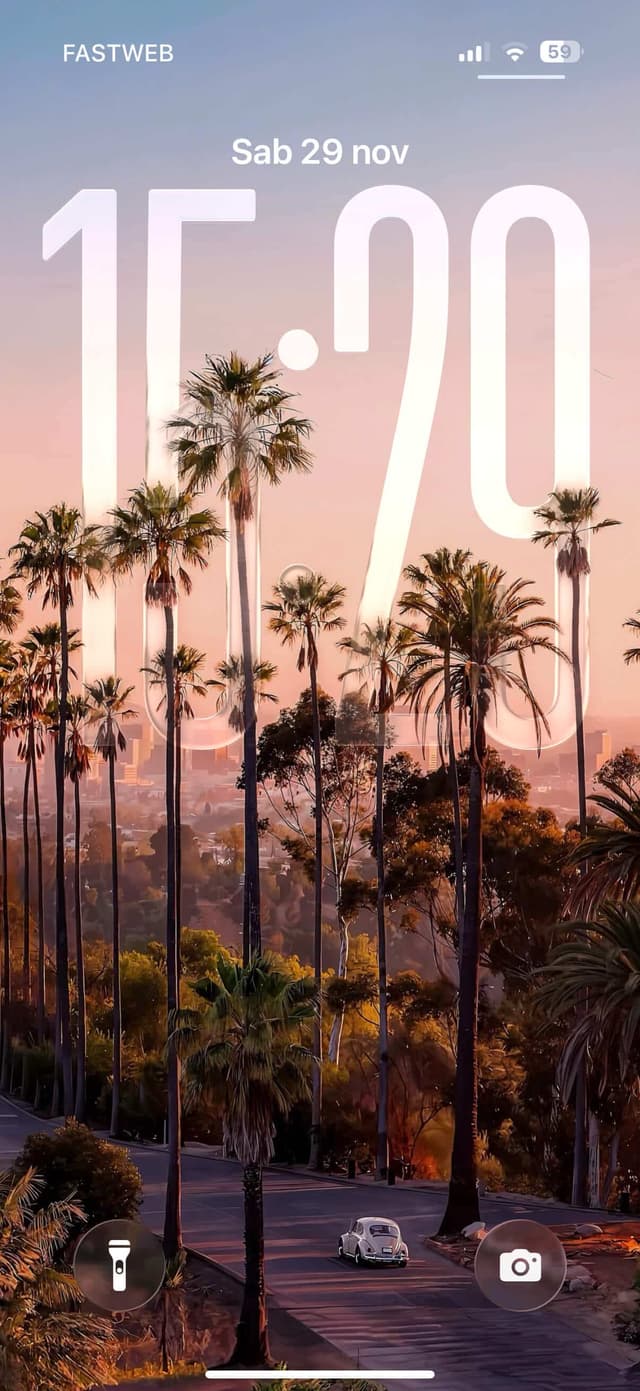
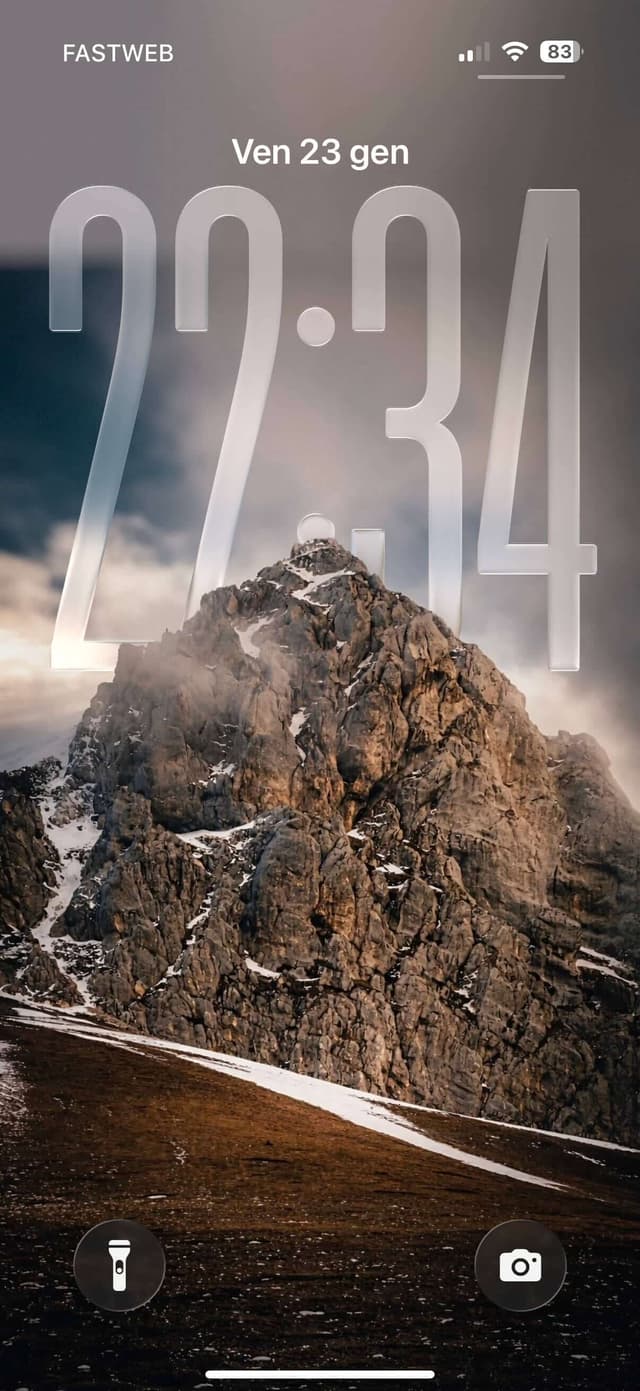
I remembered the iOS lockscreen depth effect - you know, the one where the clock sits behind a mountain peak or a person's head, creating a feeling of depth. I wanted that on Windows.
The research
I did a quick search. Nothing. No app, no tool, no Wallpaper Engine preset. Zero results for "depth effect windows desktop clock".

Fine. I'll build it myself. Plus, I really wanted to vibe-code something small with Claude Code.
I got curious as to how Apple does it.
There must be some Meta Segment Anything alike model under the hood. At least that's the first thing that comes to mind when it comes to object masking. That's the only thing I knew.
Turns out the model Apple developed is called ML Depth Pro. And the technique is called Monocular Depth Estimation.
Monocular Depth Estimation
It's called monocular because the depth is calculated from a single point of "view" - from a single image.
For context: to estimate the depth, humans make use of binocular vision. To recreate this by technological means would naively require two cameras - stereo cameras or a sophisticated LiDAR scanner. Won't go further about it, there's a nice article on how we make things make sense in a 3D world.
Maybe calculated is not the right word here.
Estimated? - Honestly, whatever makes tech-bros happy.
In order to predict the depth, the model has to be trained on a large dataset of images with corresponding depth maps.
Now hear me out...
In the case with Apple, on top of "publicly" available datasets, they probably had a lot of your their own data to train on.
Ahem.. considering the amount of iPhones out there with LiDAR sensor...
Then you sprinkle some statistics and probability on top - and boom - the model is now intelligent enough to calculate the depth of new images.
To circle back to my previous theory about SAM-like model. Unlike SAM (Segment Anything Meta) models that use flat Vision Transformer architecture to predict masks, depth estimation models are backed by Multi-Scale Vision Transformer - which was found to be more efficient in processing higher resolution images without consuming a lot of resources, compared to the original ViT architecture. It is really cool to see researchers coming up with different architectures to optimize for a specific use case.
Models

ML Depth Pro
It seems to be doing a great job. I wonder if they process it on-device. But as I found out later, even the smallest model eats up a couple of GB of memory, mostly during inference. I must have done something wrong, for sure. Still, I highly doubt they're doing it locally. Even the smallest model would require a lot of energy and resources. On a device with 8GB of RAM, a short spike for a single low-res image probably isn't a big deal - but most likely they're running it in the cloud - Apple Intelligence or whatever they're calling it these days. You can just tell by how smooth the edges are where the clock is overlapped. Or maybe there are other techniques at play that I'm not aware of. Low-res inference + anti-aliasing?
There is an official repo to their model in GitHub, so I was actually considering to use it for a moment, but after a quick glance on their LICENCE and not understanding anything, I proceeded to close the tab and abandon my software engineering career look for other alternatives.
Depth Anything V2
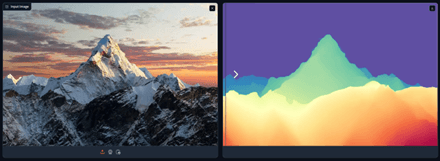
After googling a little (the traditional way, no ai), a model called Depth Anything V2 caught my eye. Their Hugging Face demo looked promising, so I uploaded a photo of a mountain I like and watched the depth map appear. It seemed to be working good enough. So I went through their repo, checked the license (Apache2 for their smaller model) and decided to go with it. Super clear instructions and easy to set up. That was the one!
Setting wallpaper
How to set the wallpaper on Windows programmatically?
There I made the mistake by asking Gemini: "How does Wallpaper Engine set wallpapers? Is there an API provided by Windows?". To which it claimed that there is no direct API. You have to rawdog it through user32.dll library, by sending a hex message 0x052C to a Progman (Program Manager) proccess.
It felt sketchy.


But it sounded cool. So I ended up not reading the answer all the way and added it as a solution to my "design prompt".
As I found out later, that message essentially spawns an additional layer/window between your currently set wallpaper and interactive layer of your desktop (icons, user input events). Wallpaper Engine uses that "technique" to inject dynamic content directly.
Perhaps setting a wallpaper 24 times a second wasn't feasible. Who knows...
Since I only need to update the wallpaper every minute, I can just generate a new image and set it as a wallpaper through simpler means. So I ended up prompting out that technique. Nevertheless, it was fun to learn about it.
Design/Idea
Layering
Setting the wallpaper itself seemed straightforward. The real question was how to place the clock exactly in between those layers.
The idea was simple:
- Split the original image into background and foreground using the depth map obtained via depth estimation model.
- Render the clock on a new transparent layer.
- Merge everything back into one layer.
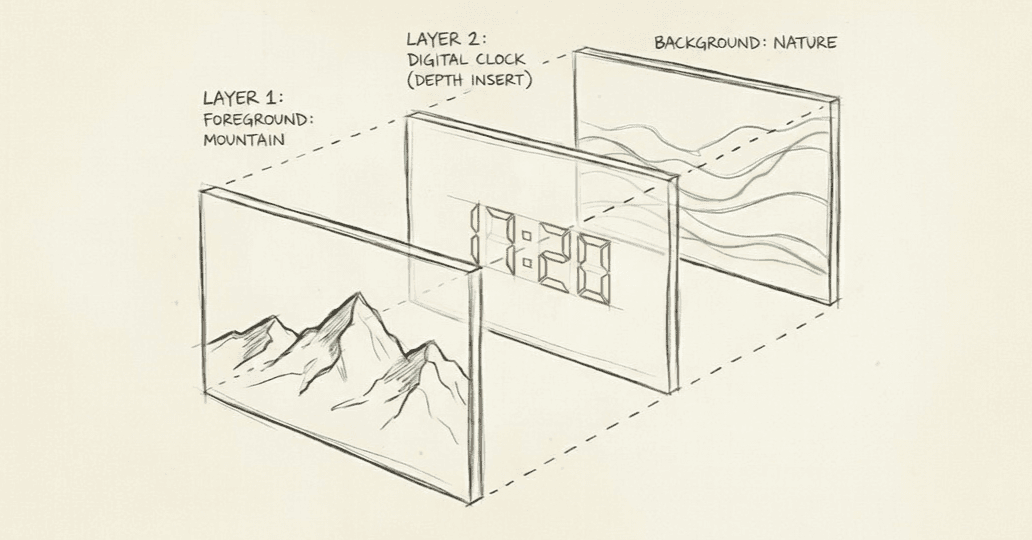
Done. At least that's what I thought could be done...
UI
Now I needed a user interface. I could've just gone with a simple console app, but after thinking it over, I decided that being able to tweak some of the configs live would make life a lot easier. After all we are vibe-coding it, so why not slop it out.
Seeing the app running in the background and being able to close/open it from tray menu now also seemed necessary.
To pull that off I needed a desktop development framework. I had zero experience with desktop apps. I mean… how different could it really be from web development, right?!
I really wanted that early Windows 98/XP look. So I went with WinForms and just disabled visual styles.
Vibe coding
I've been wanting to try Claude Code, especially after all the hype around it on X and HN.
Googled it. Checked the pricing. Yeahhh. Not worth it. Especially knowing that I might not use it beyond this project, anytime soon.
So I decided to go with Claude Desktop app with Filesystem MCP instead.
It was worse than I imagined. Half of the MCP plugins wouldn't work. Their server kept dropping, permissions were a nightmare, half the commands failed silently. I almost gave up.
After fiddling around its settings and manually cleaning its MCP folders, I somehow managed to make the Filesystem MCP work. Then I dropped my design prompt:
Create a wallpaper engine app written in WinForm C# for Windows OS that makes use of the Depth-Anything-V2 model to create a depth effect wallpaper (similar to iOS depth effect wallpapers where clock sits partially behind foreground objects) by splitting an image into 2 layers of background and foreground. Adds a new layer with digital clock in it and inserts in between those layers. It must output an image for each minute and hour. After generating the image, it must make use of the Windows progman/workerw trick to update the wallpaper at every minute passing. It must have the following features:
- Settings UI window, that can be minimized and accessed through a tray bar.
- Position sliders to control the position of the clock.
- Font, text size and color parameters to style the clock
- Modes to select from 'custom' or 'bing wallpaper/spotlight'.
- Image selection dropdown to pick a wallpaper, when 'custom' mode is selected.
- Spotlight support that gets up-to-date wallpapers for that day and caches it to work with throughout the day.
Create a wallpaper engine app written in WinForm C# for Windows OS that makes use of the Depth-Anything-V2 model to create a depth effect wallpaper (similar to iOS depth effect wallpapers where clock sits partially behind foreground objects) by splitting an image into 2 layers of background and foreground. Adds a new layer with digital clock in it and inserts in between those layers. It must output an image for each minute and hour. After generating the image, it must make use of the Windows progman/workerw trick to update the wallpaper at every minute passing. It must have the following features: - Settings UI window, that can be minimized and accessed through a tray bar. - Position sliders to control the position of the clock. - Font, text size and color parameters to style the clock - Modes to select from 'custom' or 'bing wallpaper/spotlight'. - Image selection dropdown to pick a wallpaper, when 'custom' mode is selected. - Spotlight support that gets up-to-date wallpapers for that day and caches it to work with throughout the day.
I used Sonnet 4.5 and it one-shotted the base structure. It kind of worked from the first go. But the structure of the project was honestly a bit awful.
After scanning the code for a few minutes, I developed a general understanding of what should be done to make it a bit cleaner.
As soon as I asked it to clean up the mess, I hit the session limit.
There I remembered that OpenCode exists and it comes with some interesting models that I decided to try out. Just to see what could be the difference between cutting edge models and rising stars.
I installed OpenCode and selected one of the free models at the time: MiniMax M2.1.
It worked surprisingly well, mostly for tasks you would want to depend on reasoning capabilities the least - for simple short commands. Whatever feature I asked it to add, it one-shotted them. Mostly functional code. But as soon as the session length passed 20-30k tokens, the quality of the code dropped dramatically. It straight up started to miss enclosing figure brackets thus breaking the syntax of methods and entire files. I had to undo its changes couple of times just to bring back the working version of the code.
Hard lessons
Once I lost couple of features I vibecoded earlier, I realized my mistake of not initializing a git repository early in development. I was under assumption that the integrated "undo changes" feature of OpenCode would suffice. I was largely mistaken. Either me running a window with Visual Studio in parallel to TUI broke something, I didn't know how to use the tool, or indeed something shady happened. In the end of the day, you really can't trust these smaller models as they are really prone to mistakes you can't foresee.
After a day or two, when I finally got another hour of free time, I opened my OpenCode project… and realized they'd pulled most of the free models I was experimenting with. I believe it was Big Pickle backed by GLM-4.6 and MiniMax M2.1.
I was genuinely surprised by the latter. From a quality for bucks perspective I think you get a decent value and can go quite far with it. Especially if you combine it with Opus for planning.
Big Pickle was okay too, though most of the time it gets lost in the sauce. Which I believe has something to do with its context window limitations or tool calling. Poor project coordination. Perhaps you could squeeze out even more by integrating a detailed agents.md file for it to navigate around easily. But then again, not something I would rely on for implementing anything more complex than a "create a method that adds two numbers" type of task.
Apparently, they rotate in a few new ones every now and then just to crowd test them I guess. I think it's a good opportunity to try different models from time to time. It helps you build that sense of "workflow" with each one and figure out which model fits which use case. Anyway thanks to OpenCode contributors for an amazing tool - the whole experience feels smooth, top to bottom.
Optimization with Opus 4.5
I bought Claude API credits for $20 and switched to Opus 4.5 for planning.
Every minute the app would spin my poor laptop's fan just to update the wallpaper with a new minute. After thorough check of the code, I realized that 99% of the time app would keep the model in memory. It was awful and was consuming a lot of RAM (200-300MB) idle.
I had some understanding that the app was doing some sort of "inference" every time it updated the wallpaper - keeping the model in memory - redeveloping the depth map of the same foreground and background layers while the only layer that was changing was the layer with clock - which is just ridiculous. It should be doing inference only once per image and just applying the clock layer on top of it every minute without re-generating the depth map. Ideally exploring the caching possibilities of those layers on disk is where I'd start with. But the simplest thing I thought I could quickly try is to load the model only when it is needed and the rest of the time unload it from memory. But the time it took to load the model back up every time was so long that it desynchronized the delay event of clock updates. So instead of seeing 17:45 you would see 17:43 - unacceptable.
I didn't want to waste any more time on this as we are vibe coding it anyway. Old habits I guess.
I just wanted it to stop making my laptop sound like a jet engine every minute.
So I bluntly asked it to optimize the model such it wouldn't be run this loud. I couldn't care less how it was going to do that.
I asked it to optimize and potentially apply aggressive caching techniques.
As I was in "planning" mode, I didn't know there was an interactive multi-choice input window when Opus is selected. That was a nice surprise, to see it come up with multiple optimization plans and let me choose which one I wanted to implement.
Once I confirmed the plan, I switched to Sonnet 4.5 to implement it.
It took quite some time. After I checked the code it generated, I was genuinely happy to look at something clean this time.Still not ideal. And could definitely be better with better prompting and more iterations. But it was good enough for me to call it a day.
Another thing that caught me by surprise was how it managed to calculate the exact before/after metrics. It told me the exact milliseconds saved in time and memory. I wonder what tools or code it used to measure the memory footprint. Maybe it was a hallucination, maybe not but they seemed close to reality, so I considered it did a good job.
The end
A few hours after I had DepthClockWallpaper.exe sitting in my tray. Picked my mountain photo. Hit Apply. Clock appeared right between the snowy peaks and the distant ridge. It was satisfying to look at something that was just a weekend idea.
The code and executables are on GitHub. If you are interested in the actual journey, prompts and sessions can be found within the same repository.
Peace.